Oct 2, 2020
A new Application is currently available starting October 1, 2020.
Dynamics 365 Project Operations connects sales, resourcing, project management and finance teams with a single application to win more deals, accelerate project delivery and maximize profitability.
The Project Operation New License offer:
- The Base License Cost:
- 120 USD Per User Per Month
- The Attach License Cost:
- 30 USD Per User Per Month
- Purchase Requirement:
- Entitlements per Tenant:
- Database Capacity
- Log Capacity
- File Capacity

Oct 2, 2020
This campaign program is available from September 2020 till 25 June 2021.
Customer Segment
The Dynamics SMB promotion will only be available to the following types of customers:
Net new customer tenant
An existing customer tenant which does not have an active Dynamics 365 subscription
SMB customers in trading, services, and other industries that have a customer service department and sales department
Eligible Products & Offer ID’s
Dynamics 365 Sales Professional
Dynamics 365 Customer Service Professional
| Offer GUID |
Product SKU Description |
Product SKU Part # |
| 51f99b45-3f92-4ef0-9167-b04709a62106 |
Dynamics 365 Customer Service Professional |
DYN365_CUSTOMER_ SERVICE_PRO |
| a81010d7-7859-4f6b-9f29-2e79e2573904 |
Dynamics 365 Customer Service Professional for Faculty |
DYN365_CUSTOMER_ SERVICE_PRO |
| 69998fb3-b858-476e-99ba-0d7ba65fe8fb |
Dynamics 365 Customer Service Professional for Students |
DYN365_CUSTOMER_ SERVICE_PRO |
| f28514f0-6516-4ef9-8222-1c605a05d245 |
Dynamics 365 Sales Professional |
D365_SALES_PRO |
| 45cf3a0b-260f-45d9-ae91-b82217e03612 |
Dynamics 365 Sales Professional for Faculty |
D365_SALES_PRO |
| a22ef7a9-f2f6-48f0-9060-6463852f9edf |
Dynamics 365 Sales Professional for Government |
D365_SALES_PRO_GOV |
| 8bc28c55-52ea-474a-b732-968a1d6056c8 |
Dynamics 365 Sales Professional for Students |
D365_SALES_PRO |
Terms and Conditions of the Promo
- Orders can be placed on a monthly basis
- Promo is valid for orders placed before 25th of June 2021
- For monthly orders; prices will be maintained for 12 consecutive months
- Regions eligible: Gulf and MCC and Egypt
- Qualifying customers will receive a 100% discount in the first 4 months with a minimum 1-year commitment for Dynamics 365 Sales Professional or Dynamics 365 Customer Service Professional:
- Customers must be purchasing a net new Dynamics 365 Sales Professional or Dynamics 365 Customer Service Professional customer tenant.
- An existing customer with an inactive or recently canceled (within the last 30 days) subscription may also qualify.
FAQ
- Will the new customer eligibility be enforced?
Yes, the Dynamics SMB promotion will be technically enforced
- Is there a minimum purchase requirement?
There is no minimum user purchase requirement
- How many licenses can be purchased at the promotion discount?
There is no maximum of licenses that may be purchased. Customers may purchase as many licenses as they need.
- What if I don’t start the promotion when it first becomes available?
New customers may take advantage of the Dynamics SMB promotion at any time between September 3, 2020 and June 25, 2021. Customers subscriptions must begin before June 25, 2021
- What happens to the monthly subscription price of Dynamics 365 Sales Professional and/or Dynamics 365 Customer Service Professional licenses when the promotion ends?
Microsoft will honor the September 2020 catalog prices of the licenses for the duration of the annual subscription commitment. This means if a customer starts the promotion on September 1, 2020, their price for months 5 to 12 will be the September 2020 license monthly price
- When does the 4-month Dynamics SMB promotion pricing end?
The promotion pricing expires 4 months from the subscription start date not 4 months from the CSP billing date. For example, a new customer who takes advantage of this promotion and purchases their license September 15, 2020 begins their subscription September 15. The promotion price will be honored September 15, 2020 through January 15, 2021.
- How should partners use these promotions?
Partners can include these promotions in current customer acquisition motions to enable new customers in need of digital selling or remote selling scenarios to sign up with a partner. Throughout the promotion partners have opportunity to showcase the value of Dynamics 365 Sales Professional and/or Dynamics Customer Service Professional to new customers.
- How do partners transact these promotion offers?
CSP partners can transact the Dynamics SMB promotion offers through BPS Market Place on behalf of the customer effective September 1, 2020.
- Can partners still sell the regularly priced offers without promotions to qualifying customers?
Partners who do not wish to offer promotional pricing to otherwise qualifying customers may choose to cancel the promotion applied to the subscription and rebuy the subscription on the same day to void the promotion. Partners can always sell the regularly priced offers to non-qualifying customers.
- Does the promotion apply if my customer wants to cancel existing Microsoft Dynamics 365 Sales Professional or Dynamics 365 Customer Service Professional subscriptions?
Based on the new customer definition, the promotion will not be applied because the customer has an active Dynamics 365 Sales Professional and/or Dynamics 365 Customer Service Professional or cancelled one within 30 days.
- What if my customer does not align to one of the eligible customer types?
Your customer may be eligible for the current products without the Dynamics SMB promotion or another offer. Please refer to additional details and the full list of Teams trials and offers.
Sep 28, 2020
Dynamics 365 Human Resources helps businesses empower and engage their workforce, provide modern benefits packages, and stay compliant. It provides a comprehensive personnel management solution, including performance, leave and absence, and payroll integration. Self-service programs help HR professionals and employees manage time off and benefits. Human Resources connects people and operations data to help you optimize workforce costs and take better care of employees.
For the 2020 release wave 2, we’re focused on the following areas to help you expand your offerings and extend your solutions:
- Transform the employee experience: Manage leave and absence directly from Microsoft Teams, along with full enhancements to employee and manager self-service.
- Build an HCM ecosystem: Enable streamlined integrations to recruiting and payroll partners.
- Optimize HR programs: Continue from wave 1 with additional enhancements in leave and absence and benefits management.
- Unlock your HR data: Modify existing reports and build custom reports using Azure Data Lake and Power BI Pro.
- Enrich your existing Microsoft solutions with HR data: Integrate directly with Azure Active Directory, Outlook, and other Dynamics 365 applications.
Sep 2, 2020

As of October 2021, Microsoft will no longer support Dynamics AX 2012 R3. This would be a good time for AX users to start searching for a new ERP solution.
Microsoft Dynamics 365 Finance & Supply Chain Management is what you’re looking for. In fact, Dynamics 365 will be your best upgrade.
Dynamics AX users who have a current Microsoft Dynamics annual enhancement plan can receive a 40% discount on the Dynamics 365 cloud subscription.
Advantages of the Microsoft Cloud
When you move from on-premise Dynamics AX to the Microsoft Cloud, you’ll not only be upgrading; you’ll be updating. Upgrades to Dynamics were a regular source of additional expenses and business disruption, especially if you had customization and integrations.
With Dynamics 365 Finance & Supply Chain Management on the Microsoft Cloud, you don’t upgrade – you update. The updates are automatic, performed in the background, immediately available, and accommodate your customization and integrations.
- Seamless remote connectivity
When you move from on-premise Dynamics AX to the Microsoft Cloud, you’ll not only be upgrading; you’ll be updating. Upgrades to Dynamics were a regular source of additional expenses and business disruption, especially if you had customization and integrations.
With Dynamics 365 Finance & Supply Chain Management on the Microsoft Cloud, you don’t upgrade – you update. The updates are automatic, performed in the background, immediately available, and accommodate your customization and integrations.
- Built-in disaster recovery
Locating your information and processes in Microsoft’s secure Cloud not only gives you high-performance remote access to all your ERP data and processes, but it also guarantees built-in disaster recovery for your organization.
You’ll be able to be up and running even if you can’t get to the office, and your information will be secure from both physical disasters and cyber-attacks.
- Easier integrations
Dynamics 365 Finance & Supply Chain Management is built on a Common Data Service, which connects, ERP, Power Platform (including Power BI) and all the other Microsoft business productivity tools such as Microsoft 365. That enables all of those programs to work together seamlessly.
Send and receive data, build workflows, automate processes, and create custom functionality. Your teams will be connected using processes with which they are familiar.
- Lower IT costs
A cloud-based solution eliminates the expense of owning and maintain on-premises hardware.
- Enhanced performance
The Microsoft Cloud guarantees high performance and ongoing improvements. You will never again have the expense of upgrading servers, buying extra data storage, and paying for external hosting. All that will be covered as part of your Dynamics 365 subscription.
- Stronger Security
Microsoft’s cloud platform has unparalleled security to safeguard your data. And Dynamics 365 Finance & Supply Chain Management has built-in, role-based security features such as Segregation of Duties (SODs). You can count on Dynamics 365 Finance & Supply Chain Management to support your compliance efforts and meet all your security requirements.
- Innovations such as AI, virtual agents, connected field service, and more
Advanced tools such as machine learning, artificial intelligence, virtual agents, and connected field service were once out of reach for your small or mid-sized company.
Now with Dynamics 365 Finance & Supply Chain Management, you too can leverage the latest technology advancements to unlock new opportunities and gain a competitive edge.
Aug 19, 2020
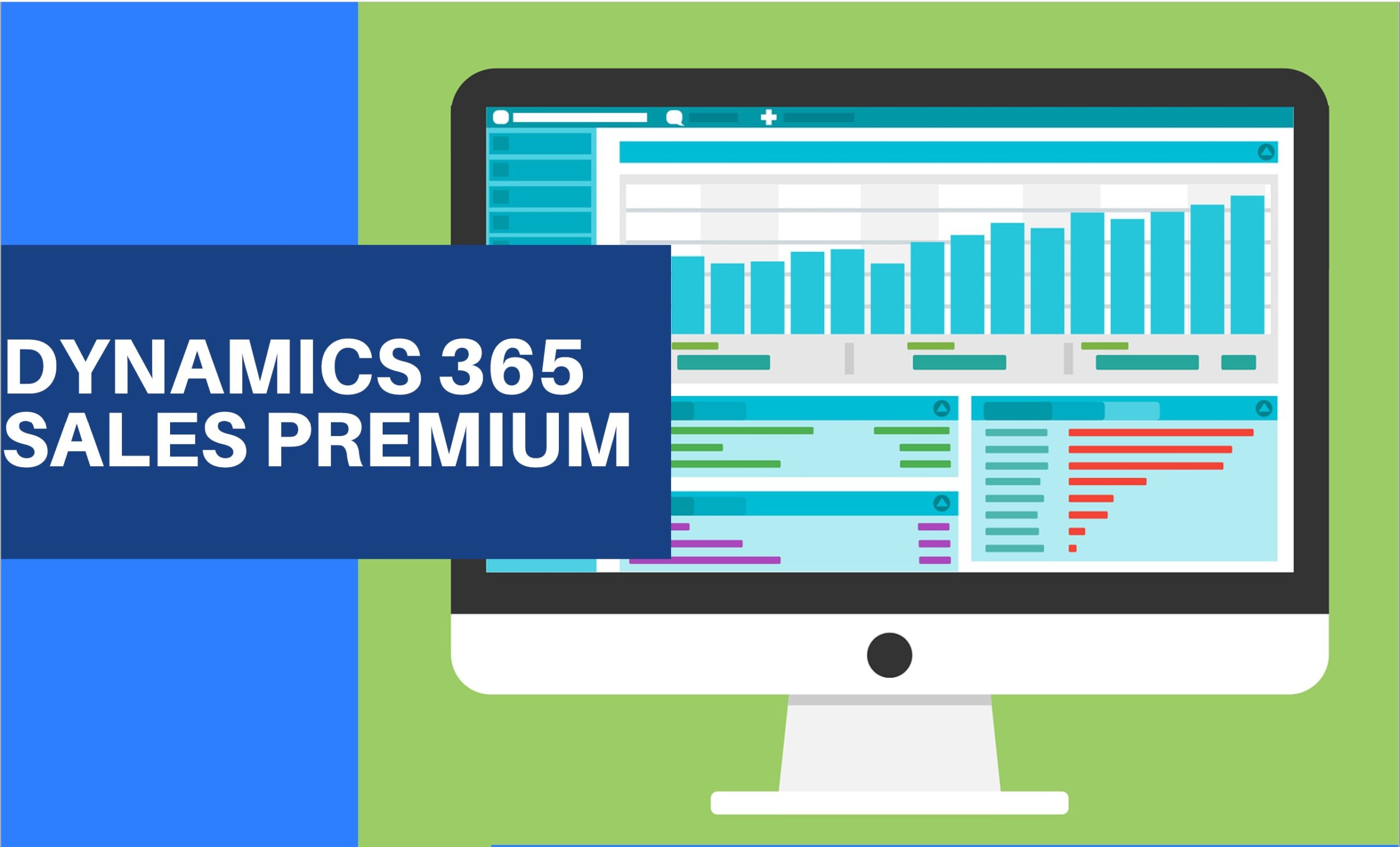
Microsoft released a new offering called Dynamics 365 Sales Premium
What is dynamics 365 sales premium?
With the new Microsoft release, you can benefit from the Dynamics 365 Sales Premium.
It’s a single user license for Dynamics 365 Sales Enterprise and Dynamics 365 Sales Insights.
What is dynamics 365 sales premium’s price?
Now you can profit from a saving of $10 over buying the applications separately.
As Dynamics 365 Sales Enterprise and Dynamics 365 Sales Insights are only at a price of $135 per user per month.
What is dynamics 365 sales insights?
This feature is intended to help sales managers or supervisors enhance their team’s performance.
It is not intended for use in making—and shouldn’t be used to make—decisions that affect the employment of an employee or group of employees, including compensation, rewards, senior i ty, or other rights or entitlement.
Sales insight helps organizations in the following four areas:
Guided selling: Guide sellers on their next course of action with timely and actionable insights.
Productivity intelligence: Free up sellers’ time by minimizing manual data entry with contextual, real – time suggest ions for updating existing records and creating new records, making sure your data is always up to date.
Connection insights: Build stronger relationships with customers and move relationships forward with AI -guided selling. Take preemptive steps to mitigate risks with a relationship health score.
Predictive models: Increase conversion and win rates by using AI to prioritize leads and opportunities with the highest likelihood to convert and buy.
Aug 3, 2020
Today most organizations are experiencing challenges and making plans that they did not anticipate. In times like these, organizations do not have time to worry about reacting to changes in accounting regulations, yet they cannot risk leaving them unaddressed.
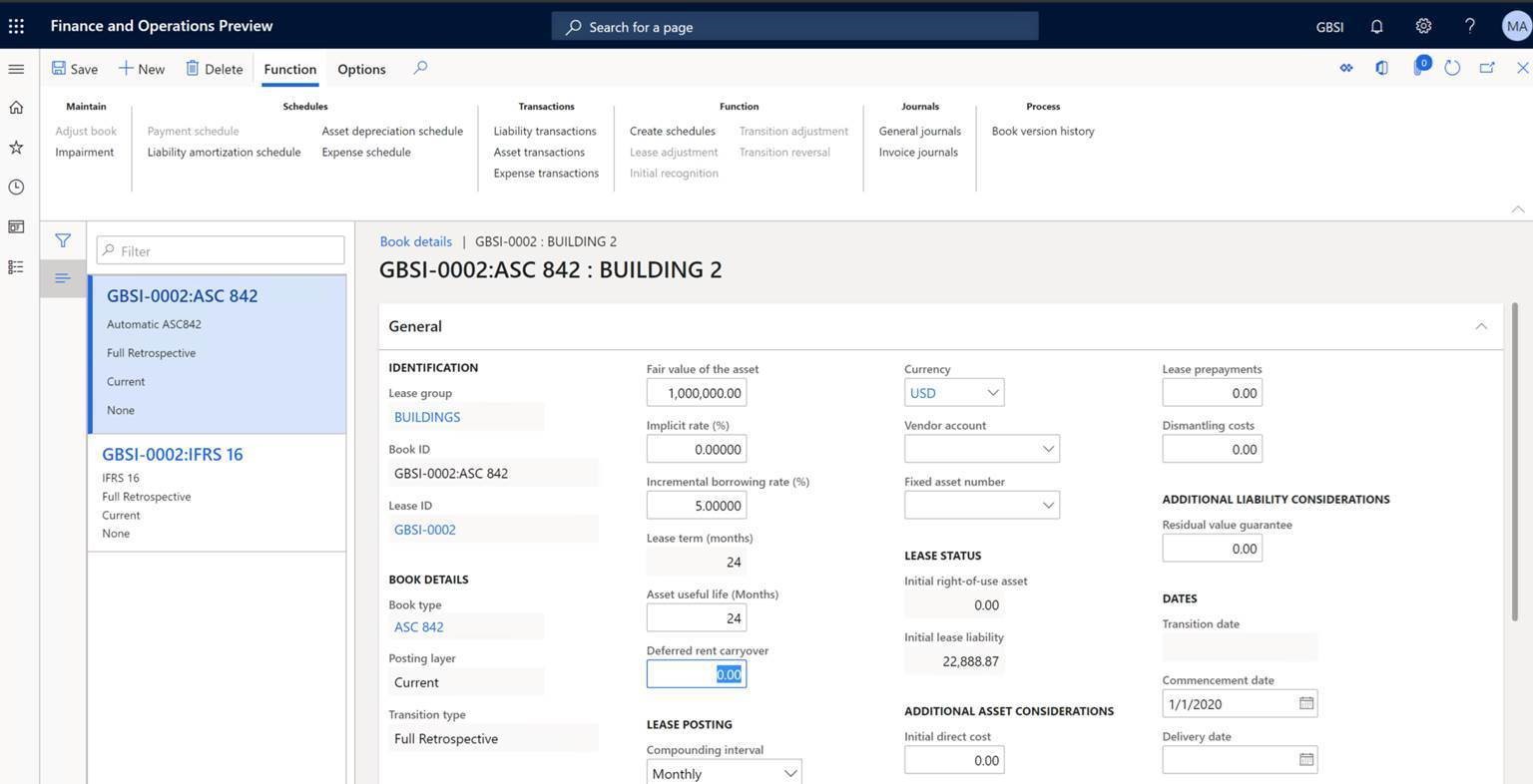
A core tenant of Dynamics 365 Finance is to enable you to reduce risk, and to automate and modernize your global financial operations. To help you achieve this, Microsoft are introducing asset leasing in November 2020. Asset leasing helps you adapt and be compliant to the FASB and IFRS 16 accounting regulations related to lease management and its financial impact. Asset leasing will reduce manual errors and save your users time through automatic lease status updates, right of use assets, wholistic monitoring and analytics, and calculations of net present value, lease interest, and future cash payments.
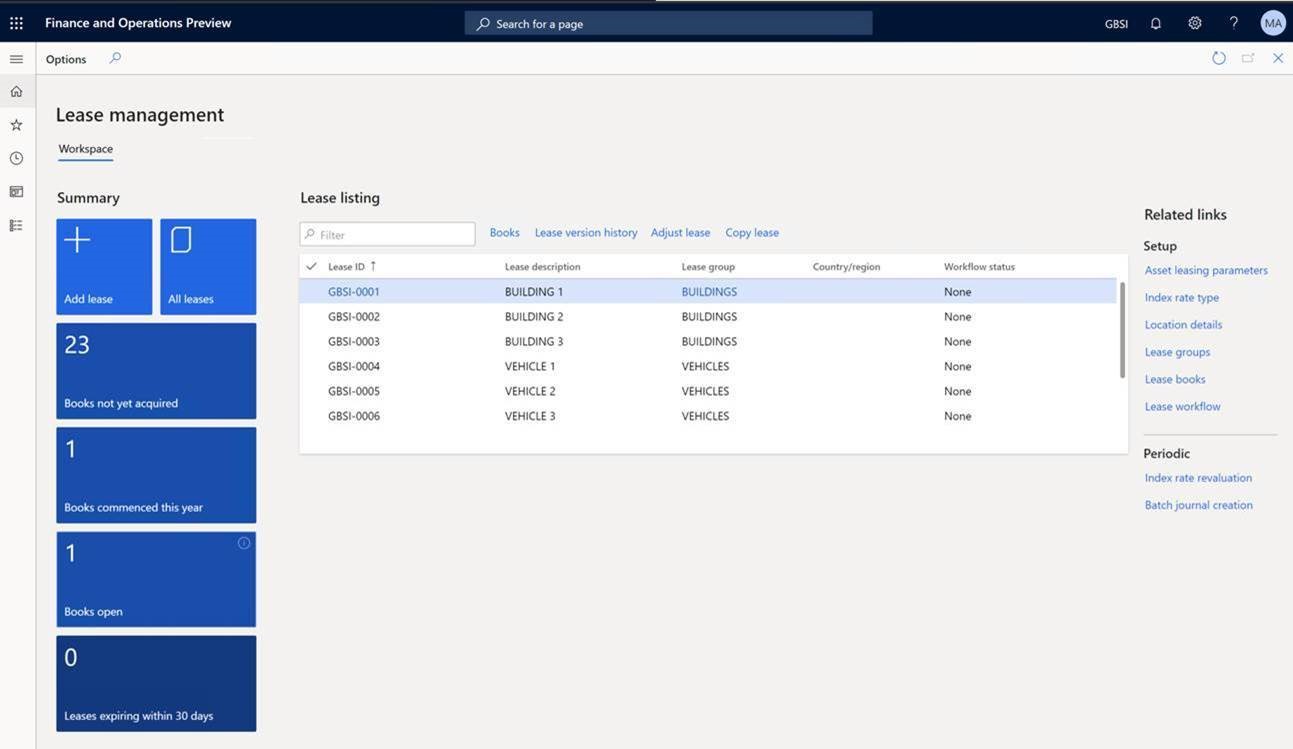
Asset leasing features:
- Automates the complex lease calculation of present value and its subsequent processes such as future lease payment, lease liability amortization, right-of-use asset depreciation, and expense schedules.
- Automatically classifies the lease as either operating or finance, or as a short-term lease or low-value lease. The lease classification tests include transfer of ownership, purchase option, lease term, present value, and unique asset.
- Centralizes the management of lease information, such as important dates, including the commencement and expiration dates, as well as the lease’s transaction currency, payment amounts, and payment frequency.
- Helps to generate accounting entries for the initial recognition, and subsequent measurement of the lease liability and right-of-use asset.
- Reduces time for complex calculation of lease modification and automatic adjustment transactions.
- Provides posting to different layers to accommodate different reporting purposes, such as tax reports that are available in Dynamics 365 Finance.
- Complies with the accounting standards to represent leases on a balance sheet using the Balance sheet impact calculator.
- Provides audit controls over the integrity of the lease data to ensure that the posted transactions match the calculated amounts of the present value, future payments, and liability amortization.
- Provides tools to import from or export to Excel for all lease data using data management.
- Includes features that help in preparing asset leasing reports, particularly the preparation of disclosures and notes.
- Integrates with company chart of accounts, currencies, fixed assets, vendors, journals, data management, and number sequences.
May 28, 2020
On the first of April, Microsoft has officially started the 2020 release wave 1, kicking off the deployment of new applications and hundreds of new capabilities and updates across Microsoft Dynamics 365 and Microsoft Power Platform.
The complete list of new capabilities for 2020 release wave 1 related to Microsoft Dynamics 365 are as follow:
Seamless B2C and B2B customer journeys across sales, marketing, and service:
Dynamics 365 Customer Insights, Microsoft’s customer data platform (CDP), including first and third-party data connections that further enrich customer profiles that can be updated and activated in real-time. Organizations can unlock the value of their data by quickly and accurately predicting customer behavior using out-of-the-box AI templates for churn, customer lifetime value, and next best action recommendations, as well as enable deeper insights with Microsoft Azure Synapse Analytics.
B2B organizations can take advantage of new customer engagement capabilities in Dynamics 365 Sales, Marketing, Customer Service, and Field Service to provide customers with unified, consistent, and personalized experiences throughout the entire buyer journey. Sales teams can leverage advanced AI-powered predictive sales forecasting and a new sales acceleration hub for inside sellers. Marketers can enhance campaigns with more personalized and sophisticated email messages, integrated surveys using Microsoft Forms Pro, and aggregated data and segments from Customer Insights. In addition, service centers benefit from centralized scheduling capabilities for dispatchers to schedule technicians and new omnichannel capabilities to reach customers on their preferred channels.
Delivering seamless omnichannel retail experiences:
Dynamics 365 Commerce delivers an end to end retail solution that helps organizations deliver personalized, omnichannel experiences through advanced e-commerce capabilities, intelligent product recommendations, and enhanced clienteling. With Dynamics 365 Commerce, Finance, Supply Chain Management, and Microsoft Power BI you gain greater visibility into an end-to-end processes and virtual warehouses, as well as get a single view of customers across retail and e-commerce.
Exceed customer expectations with an intelligent supply chain:
Dynamics 365 Supply Chain Management is updated to deliver predictive insights and intelligence from AI, IoT, and mixed reality to your organization across planning, production, inventory, warehouse, transportation management, and asset management.
Microsoft has added out-of-the-box IoT capabilities that leverages Azure IoT Hub to connect signals from mission-critical assets with business transaction data. This enables manufacturers to improve uptime, throughput, and quality by proactively managing shop floor and equipment operations with a real-time view of their entire production and stock.
Supply Chain Management now integrates with Dynamics 365 Field Service to help reduce downtime of geographically dispersed mission critical assets by automating field service operations, as well as Microsoft Dynamics 365 Guides to train your workforce faster, more effectively, and in some cases, more safely using mixed reality learning experiences.
For Instance: Eaton, a multinational power management company, with 97,000 employees serving customers in 175 countries, is leveraging Dynamics 365 mixed reality solutions as part of its ‘Industry 4.0’ transformation. Following pilot evaluations by their IT and business teams, Dynamics 365 Guides and Dynamics 365 Remote Assist are being deployed globally by different business units starting with the Vehicle Group in over a dozen locations for maintenance, digital layout, training, product development, and connecting global teams on knowledge transfer and best practices sharing.
In addition to these highlights for operations, we’re introducing Dynamics 365 Finance Insights, which brings the power of AI into your finance processes, as well as Dynamics 365 Project Operations, a comprehensive solution for service organizations to connect and run every part of the business.
Power Platform: New ways to analyze, act, and automate
Power Automate adds robotic process automation (RPA)
Power Automate already helps hundreds of thousands of organizations automate millions of processes every day. With the addition of RPA, Power Automate will help these organizations to also automate their legacy apps and manual processes through UI-based automation. The key Power Automate RPA capabilities that are reaching general availability today include RPA for attended and unattended scenarios, a flexible business model to support any business scenario, and several AI Builder models.
Power Automate now provides a single solution for end-to-end automation that spans on-premises systems and the cloud. This approach addresses three primary areas:
- Intelligent understanding of data: Structured and unstructured data from paper-based invoices to images can be easily understood and integrated with other critical business applications. AI-driven capabilities like forms processing in AI Builder are now generally available.
- RPA connects to enterprise applications without APIs: Some applications are too old or expensive to support API connectivity. With UI flows, end users can automate their work in these applications by recording manual tasks such as mouse clicks, keyboard inputs, and data entry, and then automate the replay of these steps to integrate with legacy systems.
- Connecting to over 300 modern apps and services: It is easy to work with information stored in the cloud or on-premises apps and databases. We offer native connectivity to common apps or a company’s APIs with over 300 connectors out-of-the-box.
Power Apps adds mixed reality experiences
Today, we’re announcing new mixed reality capabilities coming to Microsoft Power Apps. With these new features, Power Apps is one of the first low-code no-code platforms that makes it possible for everyone to build mixed reality applications.
With hundreds of millions of augmented reality capable mobile devices in the hands of business users, every Power Apps maker will be able to leverage the power of mixed reality to extend their apps with the ease of drag-and-drop development. With these new capabilities, makers can start to digitize workflows in physical space in new and innovative ways.
Power BI adds new capabilities
Microsoft Power BI is delivering new capabilities focusing on three key areas to help customers drive a data culture:
- Building on Power BI’s core amazing data exploration experiences, we’ve added the highly requested decomposition tree AI visual, a new Q&A experience, and added a modern ribbon that users are familiar with from Microsoft Office.
- As we continue to meet the most demanding needs of our enterprise customers, we are adding full application lifecycle management, with the ability for customers to move an app through a deployment pipeline. We have also completely opened Power BI’s semantic models by adding full support for the industry standard XML for Analysis (XMLA) protocol.
- Finally, to help our customers weave business intelligence deeply into the fabric of the organization, we’ve added support for Microsoft Information Protection and Microsoft Cloud App Security to protect data even when it leaves Power BI, added deep integration with Azure Synapse, and a completely revamped Microsoft Teams integration.
May 14, 2020

Microsoft are announcing a product name change only for some of Microsoft365 products. There are no pricing or feature changes at this time!
The new product names are already into effect since the 21st of April , 2020. The below table shows the Old & New naming for each modified product:
| Old Name |
New Name |
| Office 365 Business Essentials |
Microsoft 365 Business Basic |
| Office 365 Business Premium |
Microsoft 365 Business Standard |
| Microsoft 365 Business |
Microsoft 365 Business Premium |
| Office 365 Business |
Microsoft 365 Apps. For Business |
| Office 365 ProPlus |
Microsoft 365 Apps. For Enterprise |
However, no changes were done for the below products:
- Office 365 for Enterprise (E1, E3, E5)
- Office 365 for Firstline workers (F1)
- Office 365 for Education (A1, A3, A5)
- Office 365 for Government (G1, G3, G5)
Linked below are two comparison sheets for both Microsoft 365 and Office 365 showing the availability features/products for each plan for both Commercial & Educational plan
May 11, 2020
According to the principle of licensing applications from MS Dynamics 365 family, Business Central application is also licensed under the concept of a named user (each user requires a license). The exception here is the new Business Central Device license introduced this year, which allows it to be used on a device aggregating the work of many end users, such as data collectors, POSs and others.
Until now, there was a certain license incompatibility of this product with respect to the entire Dynamics 365 family. The division of Base (Base) model and additional (Attach) had no application in Business Central. This aspect has also been changed with the publication of Wave 1 for 2020. Regardless of the choice of Business Central (Essential / Premium) version, the following licenses have been added:
- Sales Professional Attach,
- Customer Service Professional Attach.

This means, that if we have at least one Business Central license (Essential or Premium), we qualify for the base (base) license offer for the other two products of the Dynamics 365 family, which are:
- Dynamics 365 Sales,
- Dynamics 365 Customer Service.
If the need to use these applications is required by the customer, then it is possible to buy them in the form of “attach” to existing Business Central licenses at a very bargain price.
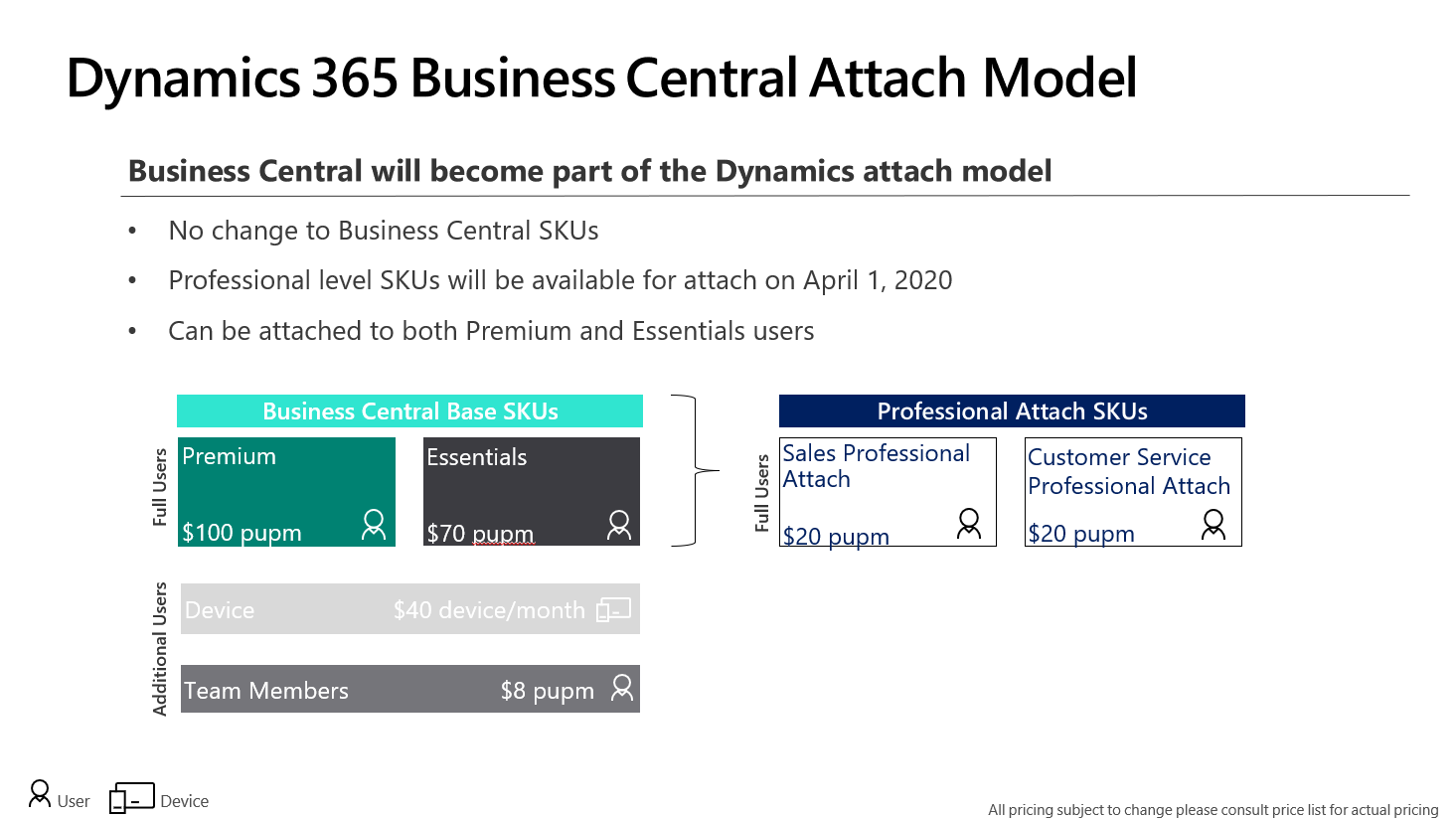
Attention! Please note, that any such license can only be attached to the base license. For example, it is not possible to have 1 Business Central license (Essential or Premium) and to attach three licenses for Sales or Customer Service. Similarly, it will not be possible to assign such license as attached to a user who does not have a Business Central primary license assigned.
Apr 14, 2020
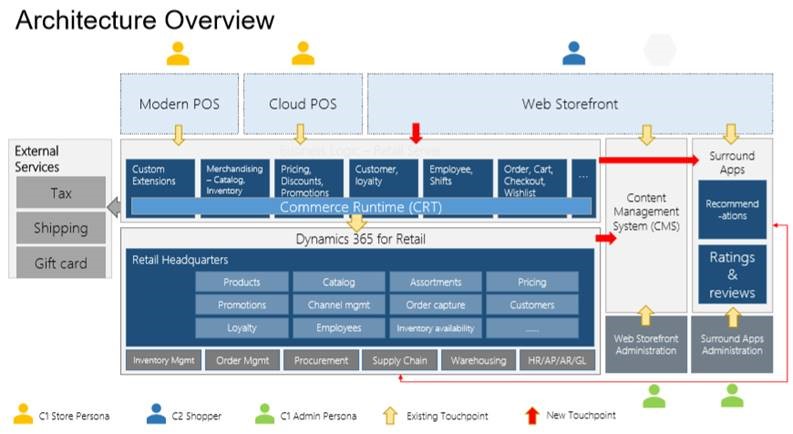
What is the New Evolution of Microsoft 365 Commerce Application?
New Customer Experience:
- Product search supporting autosuggestion, paging, faceted filtering and sorting, removing stop words, smart sorting and search relevance
- Customer accounts using native logins and order history lookup
- Support for all major credit cards, PayPal, Apple Pay and Google Pa
- Integrated with Microsoft Fraud Protection
- Support for Adyen payment gateway out of the box and 3rd party payment gateway
- Customers can ship to address, BOPIS, BORIS and create split orders and shipping to multiple addresses
- Native loyalty programs, loyalty cards, card adjustments and card conflict resolution
- Support for wish lists
- Support for coupon codes and discounts
- Native ratings and review service with content moderation, spam and fraud detection and voting
- Adaptive responsive pages that scale for device and screen type
- Mobile optimized responsive web storefront
Merchandizing Experience:
- Product variants, kits and service items
- Configurable product attributes
- Category and assortment management
- Multiple inventory valuation methods
- Flexible pricing with date-effective prices, category-based prices, discounts (quantity, percentage, threshold and mixand-match discounts) and shipping- based promotions
- Centralized, currency, exchange-rate, tax and price management
- Native recommendation service using AI algorithms to deliver top, frequently bought together, people also bought and personalized product recommendations
Online Channel Extensibility
- Online SDK
- The online SDK lets developers create and customize e-Commerce modules, data actions, and themes
- Store starter kit
- The SSK contains production-ready components, modules, data actions, and themes that work with preconfigured authoring templates and pages. A developer can use the online SDK to customize each module and theme as required.
- Command-line interface tools
- Command-line interface (CLI) tools are provided as part of the online SDK. These tools help you create new modules, data actions, and themes. There is also a CLI tool that you can use to package all the configurations for your site into a single configuration file. You can then upload this file to your production or test site by using Microsoft Dynamics Lifecycle Services (LCS).
What is Starter Kit ?
A collection of modules that can be used to build an e-Commerce website.
Modules have both user interface (UI) aspects and functional behavior aspects
- Container module – acts as a host for other modules, controls the layout of the modules that are inside it
- Marketing module – includes hero, feature, content placement, content rich block, video player, and carousel modules. All these can be used to showcase content, can be put on any page, driven by data from the content management system (CMS)
- Header and footer modules – appear in the header and footer of all site pages, can be configured as required through properties
- Search modules – Products can be discovered by using the search module in the header, refiner modules can be used to further filter results on search results and category pages
- Product details page modules – use several modules to show product information. The buy box module – view products and add them to the cart, tech specs module – show the product details, ratings and reviews module – view and provide reviews
- Buy online pick up in store module – integrated with Bing Maps, used to find nearby stores for products pick up
- Purchase modules – include the cart module, checkout module (shipping address, delivery options, gift card, loyalty program, and credit card information), the order confirmation module (confirmation details)
- Account management modules – sign-in to an existing account or create a new account. After creation, the order history and order details modules can be used to view recent orders details
- Recommendations module – product placement module – supports algorithmic and editorial lists to be showcased on any page