Mar 11, 2021
What is the Lifecycle for Dynamics AX 2009, AX 2012, and AX 2012 R2?

Dynamics AX 2009, AX 2012, and AX 2012 R2 are governed by the Fixed Lifecycle Policy.
Please note that the end of Extended Support* for Dynamics AX 2009 (Service Pack 1)/2012/2012 R2 is delayed from October 12, 2021 to April 12, 2022.
No customer action is required for this extension.
After the end of Extended Support, support will end and customers will be unable to log a support ticket, even with a support plan.
*Technical support is not included in Extended Support. However, customers can use an active support contract such as Software Assurance, Dynamics Advantage Plan, or Unified Support for relevant on-premises product(s) to get technical support during the Extended Support phase.
Mar 11, 2021
Azure UAE Regions are now stronger than ever with the availability of the new Azure Services led by Azure Security!

The new services are:
Azure Sentinel has the capability to see and stop threats before they cause harm, with a SIEM and SOAR reinvented for a modern world, providing a birds-eye view across the enterprise.
Artificial intelligence (AI) makes threat detection and response smarter and faster. The platform allows for elastic scaling and eliminates the need for costly set up and maintenance. For these reasons, customers such as ASOS are leveraging Azure Sentinel to analyze data coming from separate systems and solutions.
Azure Bastion is a fully managed PaaS service that provides secure and seamless RDP and SSH access to virtual machines directly through the Azure Portal. Azure Bastion is provisioned directly in a customer’s Virtual Network (VNet) and supports all VMs using SSL without any exposure through public IP addresses.
Cognitive Services: Immersive Reader and Anomaly Detector
- Immersive Reader is an Azure Cognitive Service that allows for embedding text reading and comprehension capabilities into applications. Users of any age and reading ability are supported with features like reading aloud, translating languages, and focusing attention through highlighting and other design elements. Azure is the only major cloud provider offering this type of reading technology. No machine learning expertise is required.
- Anomaly detection capabilities can be easily embedded into apps so users can quickly identify problems. Through an API, Anomaly Detector ingests time-series data of all types and selects the best-fitting detection model for particular data to ensure high accuracy. The service can be customized to detect any level of anomaly and deployed where need it is needed most inside containers – from the cloud to the intelligent edge. Azure is the only major cloud provider that offers anomaly detection as an AI service.
This application can connect with business-critical apps and services, automating workflows without writing a single line of code. Its advantages include leveraging a write-once, run anywhere ability, a consistent integration with developer tools and services, creating business processes and workflows visually and integrating with SaaS and enterprise applications.
- Container Instances & App Configuration
Container Instances and App Configuration provide simplicity, scalability and security while modernizing applications.
Security and Protection, Artificial Intelligence, Cognitive Services, Application Integration and Modernization are leading this round of the new services announcement.
Feb 22, 2021
Business Central will be available starting July in the below countries:
- Lebanon
- Greece
- Turkey
- Algeria
- Egypt
- Malta
- Morocco
- Qatar
- Saudi Arabia
- Tunisia
- India
- Romania
- Bangladesh
- Kenya
- Sri Lanka
- Nigeria
Business value
There is a large demand for Dynamics 365 Business Central online. Microsoft is increasing the global availability to cover more countries and regions so that small and midsized businesses across the world can achieve more.
Feature details
Expansion to new countries regions is achieved through partner-led localization. Our partners create the relevant localization apps that are then published to AppSource. In combination with the built-in language offerings, Dynamics 365 Business Central is then available to serve customers in the new regions.
For more details >
Please contact your account manager or team@bpsme.com for more info
Feb 17, 2021

Feb 11, 2021

The ransomware threat is complex for MSPs
| only 31% of MSPs
are very confident they can secure their clients against future ransomware attacks |
4 out of 5 MSPs
confronted a customer-facing ransomware attack in the last year
|
24% of SMBs
have already changed MSPs in the aftermath of a cyberattack
|
Stop ransomware with AI-based protection
Acronis Active Protection is the backup industry’s most advanced anti-ransomware technology, enabling you to instantly reduce your – and your customers’ – exposure to ransomware. Plus, you don’t have to install anything on top of your backup agents as it’s already integrated into Acronis Cyber Backup Cloud.
| Ransomware detection and disarming
A set of ML-based techniques find and stop ransomware. The models used are trained continuously in the Acronis Cloud AI infrastructure.
|
Protection of backups and Acronis software
Self-defense mechanisms prevent backup-file modification, plus disruption of Acronis software processes.
|
Automatic file restore from cache
Any encrypted files are automatically restored from cache should ransomware manage to get through the defense.
|
A cyber protection platform built for MSPs
Acronis offers much more for service providers than just advanced ransomware protection capabilities. Acronis Cyber Backup Cloud is a part of Acronis Cyber Cloud, a multi-service cyber protection platform that’s built specifically for service providers. It’s your Swiss Army knife for easy, efficient, and secure delivery of cyber protection services.
| An integrated suite of services
Deliver secure backup, disaster recovery, malware and ransomware protection, secure file sync-and-share, and file notarization.
|
A service provider platform
Ensure superior efficiency with unified service provisioning, accounts management, monitoring, integrations and white-labeling.
|
Complete cyber protection
Go beyond backup and recovery – ensure complete data safety, accessibility, privacy, authenticity, and security.
|
Feb 11, 2021
Security Center is in active development and receives daily improvements that help you strengthen your environment and your hybrid cloud posture while tracking compliance with the policies and standards.

The added enhancements are explained in details below.
- Azure Defender for SQL servers on machines: Azure Security Center offers two Azure Defender plans for SQL Servers to protect your databases and their data wherever they are located.
- Azure Defender for Azure SQL database servers – defends your Azure-native SQL Servers.
- Azure Defender for SQL servers on machines– extends the same protections to your SQL servers in hybrid, multi-cloud, and on-premises environments.
Azure Defender for SQL includes vulnerability assessment capabilities.
The vulnerability assessment tool includes the following advanced features:
- Baseline configuration to intelligently refine the results of vulnerability scans to those that might represent real security issues.
After you have established your baseline security state, the vulnerability assessment tool only reports deviations from that baseline state.
Results that match the baseline are considered as passing subsequent scans.
This lets you and your analysts focus your attention where it matters.
- Detailed benchmark information to help you understand the discovered findings, and why they
relate to your resources.
- Remediation scripts to help you mitigate identified risks.
- Two new Azure Defender plans have been newly added.
Microsoft Azure has added two new cloud-native breadth threat protection capabilities for your Azure environment. These new protections greatly enhance your resiliency against attacks from threat actors, and significantly increase the number of Azure resources protected by Azure Defender.
- Azure Defender for DNS – continuously monitors all DNS queries from your Azure resources.
- Azure Defender for Resource Manager – automatically monitors all resource management operations performed in your organization.
- Revitalized Security Center experience in Azure SQL Database & SQL Managed Instance
The Security Center experience within SQL provides access to the following Security Center and Azure Defender for SQL features:
Security Center periodically analyzes the security state of all connected Azure resources to identify potential security misconfigurations.
It then provides recommendations on how to remediate those vulnerabilities and improve organizations’ security posture.
A detection service that continuously monitors Azure SQL activities for threats such as SQL injection, brute-force attacks, and privilege abuse.
This service triggers detailed and action-oriented security alerts in Security Center and provides options for continuing investigations with Azure Sentinel, Microsoft’s Azure-native SIEM solution.
A vulnerability assessment service that continuously monitors Azure SQL configurations and helps remediate vulnerabilities.
Assessment scans provide an overview of Azure SQL security states together with detailed security findings.

- Azure Defender for SQL support for Azure Synapse Analytics dedicated SQL pool:
Azure Synapse Analytics is an analytics service that combines enterprise data warehousing and big data analytics.
Azure Defender for SQL protects your dedicated SQL pools with:
- Advanced threat protection to detect threats and attacks.
- Vulnerability assessment capabilities to identify and remediate security misconfigurations.
- Recommendations page has new filters for environment, severity, and available responses:
Azure Security Center monitors all connected resources and generates security recommendations. You can use these recommendations to strengthen your hybrid cloud posture and track compliance with the policies and standards relevant to your organization, industry, and country.
As Security Center continues to expand its coverage and features, the list of security recommendations is growing every month.
With the growing list, there is a need to be able to filter to the recommendations of greatest interest. You can now filter the list of security recommendations according to a range of criteria.
In the following example, the recommendations list has been filtered to show recommendations that:
- are generally available (that is, not preview)
- are for storage accounts.
- support quick fix remediation.

The filters that were recently added provide options to refine the recommendations list according to:
- Environment– View recommendations for your AWS, GCP, or Azure resources (or any combination)
- Severity– View recommendations according to the severity classification set by Security Center.
- Response actions– View recommendations according to the availability of Security Center response options: Quick fix, Deny, and Enforce.

Feb 4, 2021
On February 1, 2021, the following products will be changed to end-of-life:
- Dynamics 365 Customer Service Insights (including “Additional Cases”)
- Dynamics 365 Virtual Agent for Customer Service
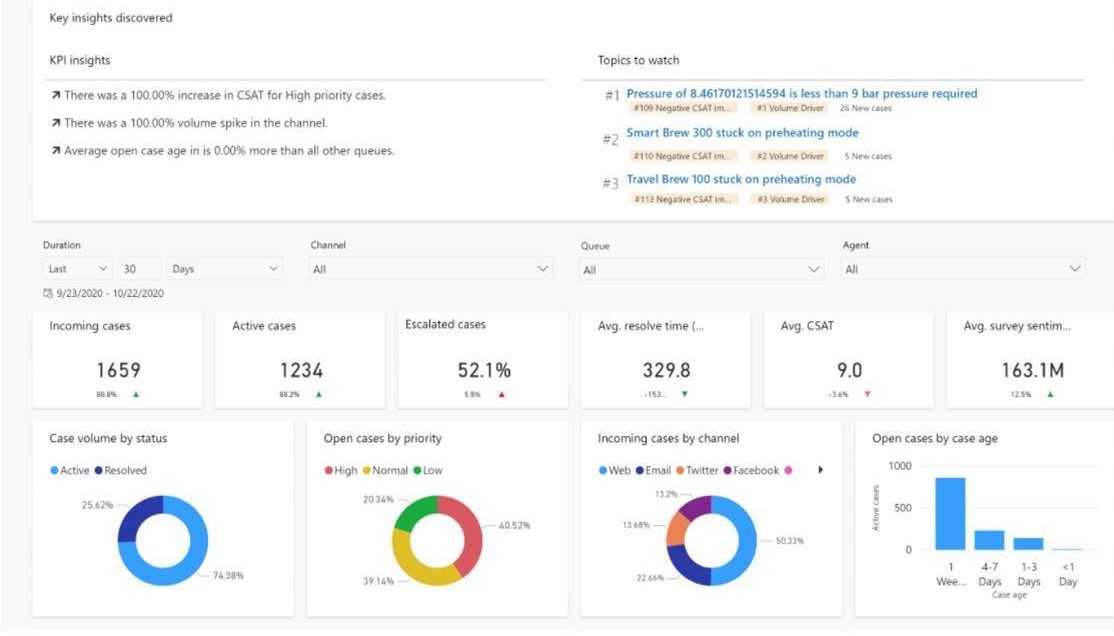
The “Customer Service Insights” standalone experience is moving into “Dynamics 365 Customer Service”, where customers can find the same capabilities deeply embedded in the customer service experiences.
What is customer service insights?
Dynamics 365 Customer Service Insights helps both agents and customer service managers make better decisions and proactively improve customer satisfaction by using artificial intelligence (AI) and analytics capabilities for Customer Service and Omnichannel. You can empower your teams with insights into customer satisfaction–boosting analytics and AI-powered features to spend less time searching and more time engaging with customers.
As an agent, you can leverage real-time similar cases and knowledge article suggestions that are customized for the current context. The AI-driven technology empowers agents to help solve customer issues more quickly, improving resolution rates and customer satisfaction.
These capabilities are deeply embedded into the core agent and manager experiences in Customer Service and Omnichannel.
Feb 2, 2021

Summary
Campaign starts on the 2st February, will end on the 31st of August 2021. It aims to reward Partners when bringing ACA, and while hitting campaign ACR thresholds. This campaign encourages Partners to bring ACA and accelerate ACR increase
Start date : 2st of February 2021
End date: 31th of August 2021
Campaign consists of an earning Period from 2st of February 2021, till 30th of June 2021, and a monitor period from 1st of July 2021, till 31st August 2021.
Customer segment
SMB only
Eligible Products
Azure, Azure RI
The Program
Consists of an earning Period from 1st of February 2021, till 30th of June 2021, and a monitor period from 1st of July 2021, till 31st August 2021.
Criteria
- CSP indirect Resellers must be enrolled in the “Campaigns” program on partner center to be eligible for the campaign
Terms and conditions
- CSP indirect Resellers will earn incentive payment of 500 USD, when they bring new eligible customer add
- Partner must bring an eligible new customer add, with 0 ACR per months, 12 months prior to campaign start date. Customer has to maintain the 250 USD ACR for 3 consecutive months, during campaign period
- For new eligible customers hitting 250 USD in June, the ACR will be monitored in July 2021, and August 2021 to stick to the 3 consecutive months rule
- Any new eligible customer hitting 250 USD ACR threshold for the 1st time in July 2021, and August 2021 (Monitor period after end of campaign) will not be counted as new customers, hence Partner will not earn incentive against those customers.
- If customer drops his ACR to below $250 during campaign period, Partner will not be eligible for incentive payment.
- Trial subscriptions are excluded from incentive program
Customer segment
SMB only
Eligible Products
Azure, Azure RI
Payment
Incentive Payments are transferred via wire transfer.
Eligible Participants who earned incentive will be paid within 60 days after end of August 2021
Jan 26, 2021

Microsoft provides a holistic approach to security, helping you to protect identities, data, applications, and devices across on-premises, cloud, and mobile.
Foundational to the security of every computer system are the following:
- Threat protection using Microsoft Defender for Office 365 which safeguards your organization against malicious threats posed by email messages, links (URLs), and collaboration tools.
There are two available plans, the following table summarizes what’s included in each plan.
| Microsoft Defender for Office 365 Plan 1- $2.00/user/month |
Microsoft Defender for Office 365 Plan 2-
$5.00/user/month |
Configuration, protection, and detection capabilities:
Safe Attachments
Safe Links
ATP for SharePoint, OneDrive, and Microsoft Teams
Anti-phishing in Defender for Office 365 protection
Real-time detections |
Microsoft Defender for Office 365 Plan 1 capabilities+
Automation, investigation, remediation, and education capabilities:
Threat Trackers
Threat Explorer
Automated investigation and response
Attack Simulator
Campaign Views |
Learn more
- Information protection and Identity and access management using Office 365 Data Loss Prevention and Exchange Online Archiving
- Office 365 Data Loss Prevention – $3.00/user/month
That helps your organization:
- identify sensitive information across many locations, such as Exchange Online, SharePoint Online, OneDrive for Business, and Microsoft Teams.
- Prevent the accidental sharing of sensitive information.
- Monitor and protect sensitive information in the desktop versions of Excel, PowerPoint, and Word.
- Help users learn how to stay compliant without interrupting their workflow.
- View DLP alerts and reports showing content that matches your organization’s DLP policies.
Learn more
- Exchange Online Archiving – $3.00/user/month
That assists your organization with your archiving, compliance, regulatory, and eDiscovery challenges while simplifying on-premises infrastructure, and thereby reducing costs and easing IT burdens.
Learn more
Jan 8, 2021
What’s New : Meetings
Virtual Breakout Rooms
Breakout rooms allows meeting organizers to divide the meeting into smaller groups to facilitate discussions and brainstorming sessions. A breakout room can be created in a Teams meeting or a Teams channel meeting, allowing greater flexibility on how you want to meet. Organizers can easily jump in between breakout rooms, deliver announcements to all breakout rooms at once, and bring everyone back to the main meeting at any time. Any files from the breakout rooms can be shared in the main meeting and is available afterwards in the meeting chat. Learn more.
End-of-meeting notifications
Microsoft Teams notifies the participants in a meeting when there are five minutes remaining in the scheduled meeting time. The notification appears on screen for 10 seconds and disappears without any user action. This helps you stay on track and wrap up as necessary without unintentionally running late to your next schedule. Notification is triggered for all scheduled private and channel meetings and does not cause the meeting to end automatically.

Teams meeting pre-join experience
We have now improved the pre-join meeting experience for Teams meetings including easier discovery of audio, video, and device configurations before joining a meeting. Previously, you had to go to settings to change meeting devices, but now these can be easily adjusted prior to the meeting in the pre-join experience.

New languages supported for real-time translation in live events
Translate Japanese, Korean, French, French-Canadian, Spanish, Spanish-Mexican, Traditional Chinese, Swedish, Dutch, Italian, Hindi-Indian, Portuguese-Brazilian, and Russian into up to 50 different languages. Learn more.
Live events limit increases are extended until June 30, 2021
To continue help support our customers, through June 30, 2021, we extended limit increases for live events, including:
- Event support for up to 20,000 attendees
- 50 events can be hosted simultaneously across a tenant
- Event duration of 16 hours per broadcast
Additionally, events for as many as 100,000 attendees can be planned through the live events assistance program. Learn more.
What’s New : Calling
Multiple Number Dialing
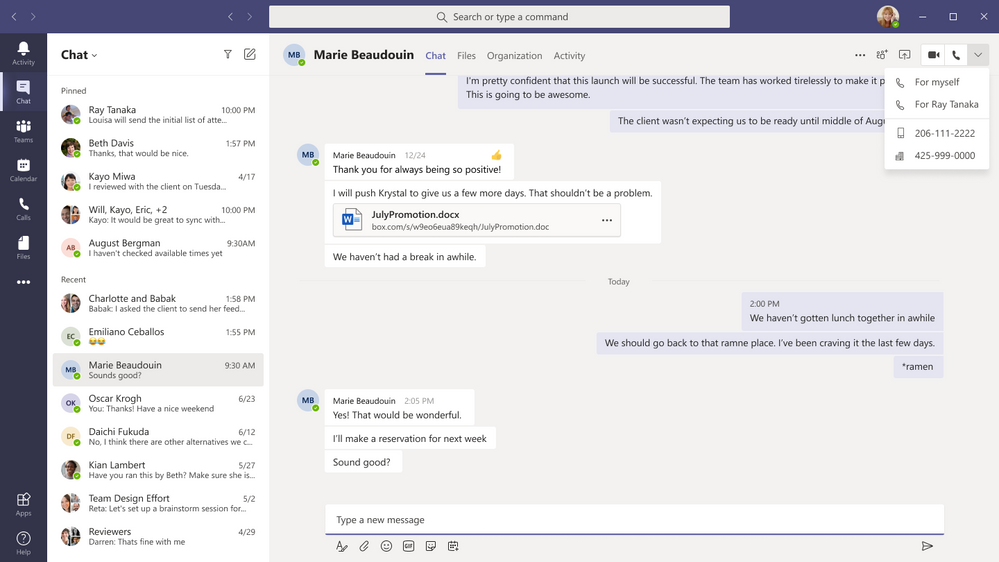
You can now see a split button in the chat header for audio/video calling. This displays multiple numbers for a single contact making it easier to view available numbers to initiate a call.
Live Captions for 1:1 Calls
Whether you’re in a noisy environment or just missed what was said, live captions can make it easier to follow along in calls. Admins can disable this capability if desired, and users have control to turn these off. For the most accurate captions possible, it is recommended to speak clearly into the microphone and avoid having multiple people speaking at the same time.
What’s New: Devices
New features rolling out to Microsoft Teams Rooms on Windows
The latest app for Microsoft Teams Rooms on Windows, version 4.7.15.0 is now available in the Teams Admin Center. The latest update includes the following new capabilities:
- Cortana Voice Assistance (Preview): Launching in Preview, in-room meeting attendees can now use voice assistance powered by Cortana to join and end their meetings without touch. Using natural language, people can simply state “Cortana, join/end my meeting” for a seamless hands-free experience.
- Control Spotlight from console: People in the meeting room can now control the Teams meeting Spotlight feature from the Teams Rooms console control. Once enabled, the individual identified as the spotlight will be the main video shown to all participants in the Teams meeting.
- Share HDMI audio: A highly requested feature, users connecting to a Teams Room via HDMI can now share their PC audio into the Teams meeting.

Enhanced meeting experiences on Teams phones
Teams phones now support a new video layout including 3×3 gallery view, large gallery view for more participants and Together mode. Using 3×3, users can see the video feeds of up to 9 meetings participants at a time. For even larger meetings, enable large gallery view to show up to 49 participants. Teams phones now also supports Together mode, the meeting experience where participants are transported to a virtual shared space. No matter which style of meeting you select you can always enable background blur to reduce distractions and obscure any imagery found in a video setting.
Proximity Join for Teams conference phones
Proximity based meeting join for an available Microsoft Teams conference phone is supported from this update. The Microsoft Teams client on your PC and mobile detect proximity of the conference phone via the BLE beacon transmitted by the phone and allow you to add the phone easily to the meeting from your pre-join screen on your desktop or mobile client. When a user adds the conference phone to the meeting, the phone would auto accept the incoming meeting request. Learn more.
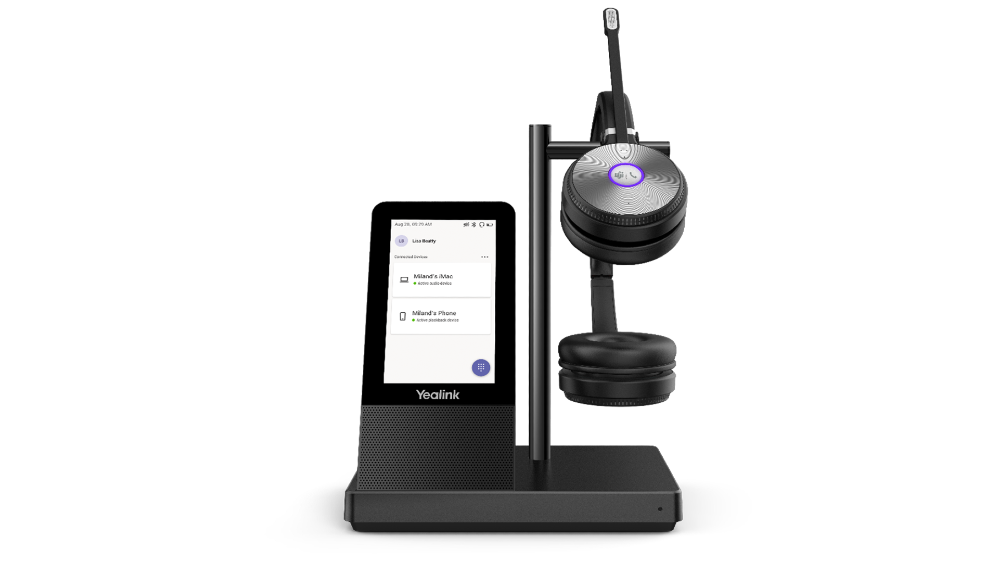
New unified communication workstation and phone form factors from Yealink and Audiocodes
Yealink is excited to introduce a new set of peripherals, the WH66 and WH67, an integrated unified communication workstation. The all-in-one format has a built-in speakerphone, wireless mobile phone charger, multi-touch screen and USB hub. Calling is now even more convenient with a dedicated Teams button. All these features reduce the number of tools and wires on a desktop, simplifying a workspace and boosting productivity.